

|
|
| MakeMusic Forum > Public Forums > Plug-In Development - FORUM HAS MOVED! > New Beta plug-in: JW Change v0.27 | Forum Quick Jump
|
 |
KennethKen
Registered Member

      
Date Joined Dec 1998
Total Posts : 2570
| Posted 6/24/2012 2:14 PM (GMT -6) |   |
Jari Williamsson said...
KennethKen said...
Here's a test file. Selecting Note Entries/Resize - All - Ornament Articulation - Visible does not affect notes with tr symbols that use EngraverFontExtras as the type face. Ok, now I see what mean. I'll support those specific slots in EngraverFontExtras in the next beta.
Don't forget the double mordent (aka long trillo) in all the fonts (slot 181).
There are also shakes(?) in Broadway Copyist (e.g., slots 68, 143) which don't respond to the Ornament or Idiomatic Articulation filters. And the Jazz Font ornaments don't appear to be hooked up (tr; shakes -e.g., 136, 124; mordent 77, etc.).
Ken
Windows 7 Pro (64 bit), Finale 2012a, Core i7 2700K@3.50Ghz, 8GB RamBrass music, Woodwind Music, Concert Band Music, CDs, etc. | | Back to Top | |
|
KennethKen
Registered Member
Date Joined Dec 1998
Total Posts : 2570
| Posted 6/21/2012 12:23 PM (GMT -6) | |
Jari Williamsson said...
Kenneth: If you want to switch the triplet beam stubs to the left in your example picture, I would suggest the "In Tuplet" entry filter.
Good suggestion. I could also get it to work with "Even Numbered", since I know, from exchanges with you that filter option refers to even numbered entires and not even number beats. My main point was that the name of the filter option that I was actually selecting didn't describe what I was actually filtering and left me to draw the association  , which leaves room for misunderstanding (especially with me). Maybe it's perfectly clear to other users.
I don't think users will mind some "bloat" as long as it serves a good purpose. In this case it could save users the frustration and trouble of coming to the forum to to bother you about what "Even numbered" refers to under section/sub-section, "Articulations/Horizontal Position" - even numbered articulations in the articulation selection DBX? articulations with an existing even numbered horizontal position? even numbered articulations within each measure? 
Ken
Windows 7 Pro (64 bit), Finale 2012a, Core i7 2700K@3.50Ghz, 8GB RamBrass music, Woodwind Music, Concert Band Music, CDs, etc. | | Back to Top | |
|
KennethKen
Registered Member
Date Joined Dec 1998
Total Posts : 2570
| Posted 6/21/2012 7:15 AM (GMT -6) | |
Jari Williamsson said...
KennethKen said...
So if my beam stub is on beat 2 and there are notes in beat 1 (and beat 1 is included in the selection) then nothing happens, right?
If this is the case then "First Entry in Selection" may be a bit clearer. The first item in each filter indicates what the filter affects. "All Entries" means that the filter popup controls entries, "All Accidentals" means that the filter popup controls accidentals, etc. Oh, right. Sorry about the double post. It appears that the filter titled "First in Measure/Sel" refers to the first entry in the measure, not the first beam stub. This is a tad confusing for me because I was in the "Beam Stub" section so I assumed "First in Measure/Sel" referred to beam stubs in the measure; so it didn't make sense that the beams stubs at the beginning of the measures below weren't being flipped. 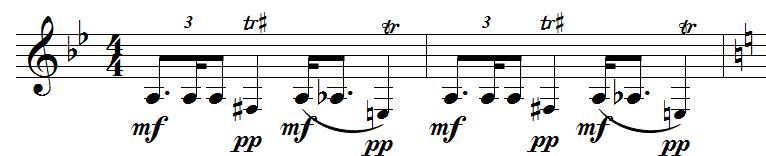
Like "Beat" (vs Upbeat or Downbeat), it may help us if you can be specific on each filter option's name (though I see you don't have a lot of space to work with in the dropdown). I think it's more intuitive to associate the main section "Beam Stub" with an abbreviated filter option's title than to associate the top selection of a long dropdown with later items in the dropdown (The heiarchy that draws the association isn't as strong if "All Entries" is just another item in the dropdown.). When I'm in the "Beam Stub" section, beam stubs are foremost on my mind. Perhaps a heading (e.g., "Entries") right above each filter's dropdown would help to clue in the user more clearer as to what all the items in the list refer to and avoid the mis-association.
Windows 7 Pro (64 bit), Finale 2012a, Core i7 2700K@3.50Ghz, 8GB Ram
Brass music, Woodwind Music, Concert Band Music, CDs, etc.Post Edited (KennethKen) : 6/21/2012 7:39:06 AM (GMT-5) Image Attachment :
dotted1.jpg 24KB (image/pjpeg)This image has been viewed 696 time(s). | | | |
| | Back to Top | |
|
KennethKen
Registered Member
Date Joined Dec 1998
Total Posts : 2570
| Posted 6/18/2012 4:33 PM (GMT -6) | |
Jari Williamsson said...
KennethKen said...
I have two beam stubs in a measure and want to the move the first one from the right to the left.
If I select the measure and then in JW Change slick on Beam Stubs - Direction - Left - First in Measure/Sel(the rest of the word doesn't show) - Apply, I get an error sound from my computer and nothing happens.
Does "First in Measure/Sel" mean that the plugin is supposed to work on the first Beam Stub in the selected region or the first beam stub in every measure of the selected region? In this case, it's the first entry in the measure and/or selection (everything in that popup are related to entries). If no beam stub appear at that first entry, nothing will happen.
So if my beam stub is on beat 2 and there are notes in beat 1 (and beat 1 is included in the selection) then nothing happens, right?
If this is the case then "First Entry in Selection" may be a bit clearer.
Ken
Windows 7 Pro (64 bit), Finale 2012a, Core i7 2700K@3.50Ghz, 8GB RamBrass music, Woodwind Music, Concert Band Music, CDs, etc. | | Back to Top | |
|
SF
Registered Member

Date Joined Dec 2001
Total Posts : 1555
| Posted 6/17/2012 5:48 PM (GMT -6) | | Great. Thanks Jari.
SF
MPB 17" 3Ghz Intel Core 2 Duo, 8GB, 10.6.8 and 10.7.4
Power Mac 2.8 Ghz Qual-Core Intel Xeon, 16GB, 10.6.7 and 10.7.4, (2) 27" Apple Displays, 23" Cinema, 20" Formac "Gallery," Acer 21"...real estate.
Finale 2.6.3-->2012a, Sib. 3.0-->7.0.3, Logic 9.1.3, QuicKeys 4.0.7, DoubleCommand DoubleCommand, Mouse Locator Mouse Locator | | Back to Top | |
|
KennethKen
Registered Member
Date Joined Dec 1998
Total Posts : 2570
| Posted 6/10/2012 6:34 PM (GMT -6) | | Is it possible to add an articulation - or, more specifically, an ornamentioned notes filter to Note Entries/Resize? I have to go through a piece and shrink a bunch of notes that have trill markings over them.
Ken
This type of thing may be beneficial to others who have to include editorial notation for ornaments or other playing techniques (e.g., ways to interpret accents, etc.)
Windows 7 Pro (64 bit), Finale 2012a, Core i7 2700K@3.50Ghz, 8GB Ram
Brass music, Woodwind Music, Concert Band Music, CDs, etc. | | Back to Top | |
|
SF
Registered Member
Date Joined Dec 2001
Total Posts : 1555
| Posted 6/1/2012 9:14 AM (GMT -6) | | Hello Jari,
I'm finally able to take some time and test the JW Change plug-in.
Under Hairpins:
Hairpins Align Left and Right: Can it be possible to add Dynamics to the the Horizontal Alignment Point pulldown menu?
I'm still a little unsure on how the UI is built but is it possible to also put a number box like seen in Vertical Position, in the Align Left and Right areas. The reason for this is that when using Measure Border or Note Entries as Horizontal Alignment Point, I will never have the end of a hairpin touch the barline and with note entries, one of my client's style is to start the hairpin to the right of the notehead not directly on the notehead. It would be nice to be able to put in a number to adjust the end points from the alignment point. If this is not possible could you add to the Hairpins list "Right Endpoint Position" and "Left Endpoint Position?"
Thanks for a great plug-in.
SF
MPB 17" 3Ghz Intel Core 2 Duo, 8GB, 10.6.8 and 10.7.4
Power Mac 2.8 Ghz Qual-Core Intel Xeon, 16GB, 10.6.7 and 10.7.4, (2) 27" Apple Displays, 23" Cinema, 20" Formac "Gallery," Acer 21"...real estate.
Finale 2.6.3-->2012a, Sib. 3.0-->7.0.3, Logic 9.1.3, QuicKeys 4.0.7, DoubleCommand DoubleCommand, Mouse Locator Mouse Locator | | Back to Top | |
| 168 posts in this thread.
Viewing Page : 1 2 3 4 5 6 7 |
| Forum Information | Currently it is Tuesday, December 19, 2023 6:32 PM (GMT -6)
There are a total of 403,820 posts in 58,165 threads.
In the last 3 days there were 0 new threads and 0 reply posts. View Active Threads
|
Forum powered by dotNetBB v2.42EC SP3
dotNetBB © 2000-2023 |
|
|