

|
|
| MakeMusic Forum > Public Forums > Finale - Windows - FORUM HAS MOVED! > The new-fangled hairpins | Forum Quick Jump
|
 |
Motet
Isorhythmic

      
Date Joined Dec 2002
Total Posts : 12849
| Posted 12/21/2016 11:45 AM (GMT -6) |   | Sibelius, and I believe Dorico, do this automatically. Though I love this sort of hacking, I agree it's rather absurd to have to resort to it. (I think I'll get back to music now!)
Harpsi, I see your point now about the vertical position--I wonder why he put the fields in a crazy order like that. But since it seems like the JW settings are sticky from session to session, probably setting everything like I did is silly.
Charles, it sounds like your problem is solved by running AHK as administrator. (As you can tell from my Window Spy, I'm running a couple-year-old version of AHK.)
Finale 2014.5, 2011b, 2005, TGTools
Windows 7, 32-bit
MIDI input
Finale Transposition ChartPost Edited (Motet) : 12/21/2016 10:54:18 AM (GMT-6) | | Back to Top | |
|
Charles Lawrence
Registered Member


Date Joined Dec 2009
Total Posts : 3638
| Posted 12/21/2016 9:05 AM (GMT -6) | |
Motet said...Dunno. The Window Spy window is scrollable--are you looking at all its contents? Or maybe they've broken it with Finale 25. --Just verified that the script still works with the status bar "window" unchecked.
I am running 1.1.24.03, which is one less than the latest 1.1.24.04. I have run into this before where you MUST, at least on my system, W10, run all AHK scripts as an administrator. When I do that, then the Window Spy does display the Status Bar Text in the appropriate box, whether the status bar is showing or not. Each box/pane in the Window Spy is scrollable, but not the entire window itself. It seems to auto size itself vertically to show all contents, at least for me. You can drag the very thin edge of the window to increase its size both vertically and horizontally, but you cannot reduce its size beyond what it sets up originally. No scroll bars ever appear for the window itself.

"Anything is possible if you don't know what you are talking about!"
Windows 10 Professional (x64) (build 10586)
3.50 gigahertz Intel Core i7-5930K, Multi-core (6 total), Hyper-threaded (12 total)
32638 Megabytes Usable Installed Memory, 17514.37 Gigabytes Usable Hard Drive Capacity
NVIDIA GeForce GTX 980 - 4GB [Display adapter]
ASUS Rampage V Extreme motherboard, Realtek HD Audio
Finale 2014.5.6359, Finale 25.2.0.92
Garritan GPO4.02
Cakewalk SONAR X3 - (X3e build 244) - x64, Sound Forge Audio Studio 10.0, Audacity 2.1.0
Sharpeye 2.68, PhotoScore Ultimate 7.0.2, SmartScore X2 Pro 10.5.8
"There is a world of difference between a person who has a big problem and a person who makes a problem big." – John MaxwellImage Attachment :
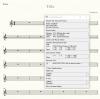
WindowSpy.png 537KB (image/x-png)This image has been viewed 401 time(s). | | | |
| | Back to Top | |
|
Charles Lawrence
Registered Member
Date Joined Dec 2009
Total Posts : 3638
| Posted 12/20/2016 7:41 PM (GMT -6) | |
Motet said...I didn't actually try it with my stuff, but I looked with AHK's Window Spy.
I'd be interested in how you looked with Window Spy. When I tried it, there was NEVER any text showing in the Status Bar Text area. If the Status Bar was displayed, you could move the cursor into the Status Bar area on the screen and Window Spy would show the text in the "Control Under Mouse Position:" area, but if the Status Bar was not displayed, then obviously, you could not position the cursor in the Status Bar area.
"Anything is possible if you don't know what you are talking about!"
Windows 10 Professional (x64) (build 10586)
3.50 gigahertz Intel Core i7-5930K, Multi-core (6 total), Hyper-threaded (12 total)
32638 Megabytes Usable Installed Memory, 17514.37 Gigabytes Usable Hard Drive Capacity
NVIDIA GeForce GTX 980 - 4GB [Display adapter]
ASUS Rampage V Extreme motherboard, Realtek HD Audio
Finale 2014.5.6359, Finale 25.2.0.92
Garritan GPO4.02
Cakewalk SONAR X3 - (X3e build 244) - x64, Sound Forge Audio Studio 10.0, Audacity 2.1.0
Sharpeye 2.68, PhotoScore Ultimate 7.0.2, SmartScore X2 Pro 10.5.8
"There is a world of difference between a person who has a big problem and a person who makes a problem big." – John Maxwell
| | Back to Top | |
|
Harpsi
Registered Member

Date Joined Jul 2004
Total Posts : 495
| Posted 12/20/2016 6:42 PM (GMT -6) | | The section with the sequences work very smoothly (as fast as my old script!), but I don't get the hairpins right.
setJWpluginpanelvalue("JW Pattern", 1, choice)
setJWpluginpanelvalue("JW Pattern", 2, "-148")
setJWpluginpanelvalue("JW Pattern", 3, 1)
setJWpluginpanelvalue("JW Pattern", 4, 0)
setJWpluginpanelvalue("JW Pattern", 5, 1)
setJWpluginpanelvalue("JW Pattern", 6, 7)
The second field only shows up if Vertical Position, slot 6, is already set to 7. Mine was not set up like that, so there was no place to insert -148 to. Slot 2 goes to "Only copy to music".
Not a big deal of course. I guess one could just set JW Pattern hairpin setting manually, they won't change anyway, and just omit those fields from the script.
Finale 2014.5, Win 10, Korg M1, Oxygen 25Post Edited (Harpsi) : 12/20/2016 5:46:19 PM (GMT-6) | | Back to Top | |
|
Motet
Isorhythmic
Date Joined Dec 2002
Total Posts : 12849
| Posted 12/20/2016 6:01 PM (GMT -6) | | | |
|
Motet
Isorhythmic
Date Joined Dec 2002
Total Posts : 12849
| Posted 12/20/2016 5:39 PM (GMT -6) | | | |
|
Charles Lawrence
Registered Member
Date Joined Dec 2009
Total Posts : 3638
| Posted 12/20/2016 5:13 PM (GMT -6) | |
Motet said...
It looks like the status bar text is still there and available to AHK even with "Windows->Status Bar" unchecked. Interesting. Good to know. Makes your life easier! I had not gone so far as to try it.
"Anything is possible if you don't know what you are talking about!"
Windows 10 Professional (x64) (build 10586)
3.50 gigahertz Intel Core i7-5930K, Multi-core (6 total), Hyper-threaded (12 total)
32638 Megabytes Usable Installed Memory, 17514.37 Gigabytes Usable Hard Drive Capacity
NVIDIA GeForce GTX 980 - 4GB [Display adapter]
ASUS Rampage V Extreme motherboard, Realtek HD Audio
Finale 2014.5.6359, Finale 25.2.0.92
Garritan GPO4.02
Cakewalk SONAR X3 - (X3e build 244) - x64, Sound Forge Audio Studio 10.0, Audacity 2.1.0
Sharpeye 2.68, PhotoScore Ultimate 7.0.2, SmartScore X2 Pro 10.5.8
"There is a world of difference between a person who has a big problem and a person who makes a problem big." – John Maxwell
| | Back to Top | |
|
Charles Lawrence
Registered Member
Date Joined Dec 2009
Total Posts : 3638
| Posted 12/20/2016 4:47 PM (GMT -6) | | |
Motet,
Clever coding, but what if the Status Bar is turned off, i.e. "Windows->Status Bar" unchecked?
"Anything is possible if you don't know what you are talking about!"
Windows 10 Professional (x64) (build 10586)
3.50 gigahertz Intel Core i7-5930K, Multi-core (6 total), Hyper-threaded (12 total)
32638 Megabytes Usable Installed Memory, 17514.37 Gigabytes Usable Hard Drive Capacity
NVIDIA GeForce GTX 980 - 4GB [Display adapter]
ASUS Rampage V Extreme motherboard, Realtek HD Audio
Finale 2014.5.6359, Finale 25.2.0.92
Garritan GPO4.02
Cakewalk SONAR X3 - (X3e build 244) - x64, Sound Forge Audio Studio 10.0, Audacity 2.1.0
Sharpeye 2.68, PhotoScore Ultimate 7.0.2, SmartScore X2 Pro 10.5.8
"There is a world of difference between a person who has a big problem and a person who makes a problem big." – John MaxwellPost Edited (Charles Lawrence) : 12/20/2016 3:54:17 PM (GMT-6) | | Back to Top | |
|
Motet
Isorhythmic
Date Joined Dec 2002
Total Posts : 12849
| Posted 12/20/2016 4:10 PM (GMT -6) | | I figured out how to have two-character triggers using the backquote character followed by any character I want (i.e., not transmitted to Finale), and how to restrict these triggers to Finale's selection tool. I'm just getting started, but `, creates a crescendo, `. a diminuendo, `7 adjusts the starting point for p, `8 for pp, and so forth. For the record, here's what I have so far. I decided to use JW Change sequences for all the endpoint adjustments, at least for now.
selection()
{
StatusBarGetText statusbartext
return InStr(statusbartext, "selection tool")
}
#If WinActive("ahk_class Finale") && selection()
`::
Input key,L1
if (key = "," || key = ".") {
if (key = ",") {
choice = 1
} else {
choice = 2
}
if (openJWpluginwindow("JW", "JW Pattern...", "JW Pattern", 3, 2, "Creates hairpin") = 1) {
setJWpluginpanelvalue("JW Pattern", 1, choice)
setJWpluginpanelvalue("JW Pattern", 2, "-148")
setJWpluginpanelvalue("JW Pattern", 3, 1)
setJWpluginpanelvalue("JW Pattern", 4, 0)
setJWpluginpanelvalue("JW Pattern", 5, 1)
setJWpluginpanelvalue("JW Pattern", 6, 7)
applyandcloseJWpluginwindow("JW Pattern")
}
} else { ; sequences
if (key = "4" || key = "7") {
task = 1
wait = p <>
} else if (key = "3" || key = "8") {
task = 2
wait = pp <>
} else if (key = "5" || key = "6") {
task = 3
wait = mp <>
} else if (key = "2" || key = "9") {
task = 4
wait = ppp <>
} else {
task = 0
}
if (task && openJWpluginwindow("JW", "JW Change...", "JW Change", 1, task, wait)) {
applyandcloseJWpluginwindow("JW Change")
}
}
Return
The wait strings are things I put in my sequence descriptions.
This is going to be a huge boon to me, not only for hairpins, but for other oft-used JW plug-in tasks as well. At least I feel like I'm ending these forums on a high note, so to speak. Thanks to all.
Finale 2014.5, 2011b, 2005, TGTools
Windows 7, 32-bit
MIDI input
Finale Transposition ChartPost Edited (Motet) : 12/20/2016 5:21:11 PM (GMT-6) | | Back to Top | |
|
Motet
Isorhythmic
Date Joined Dec 2002
Total Posts : 12849
| Posted 12/20/2016 12:10 PM (GMT -6) | | Thanks for the AHK documention pointer. I did eventually find that. I am using ?, * and b0. But if the hotstring trigger is `7, it sends ` and 7 to Finale anyway, and the latter transposes the music up a step. I can of course avoid 7, and most keystrokes are innocuous in the Selection tool, but it would be nice not to have to worry about it, and I'm kind of surprised Autohotkey doesn't have a way of not passing the keystrokes on (rather than cancelling them with backspaces).
Finale 2014.5, 2011b, 2005, TGTools
Windows 7, 32-bit
MIDI input
Finale Transposition Chart | | Back to Top | |
|
Motet
Isorhythmic
Date Joined Dec 2002
Total Posts : 12849
| Posted 12/19/2016 10:58 PM (GMT -6) | | It occurred to me that openJWpluginwindow need not close all containers first, only enough to get to the one it wants. Also, no need to go back to the top afterwards and count down again. Instead, start at the top and collapse and move down, counting until the desired one is reached. I also changed it to allow negative container numbers, -1 being the last, -2 the next from the last, so you can start at the bottom if that's closer to the desired one.
So this should speed things up a bit. Attached below. I think that will be it for me!
Finale 2014.5, 2011b, 2005, TGTools
Windows 7, 32-bit
MIDI input
Finale Transposition ChartPost Edited (Motet) : 12/19/2016 10:15:02 PM (GMT-6)
File Attachment :
Finale-jwplugins3.ahk 4KB (application/octet-stream)This file has been downloaded 397 time(s). | | Back to Top | |
| 55 posts in this thread.
Viewing Page : 1 2 3 |
| Forum Information | Currently it is Tuesday, December 19, 2023 6:27 PM (GMT -6)
There are a total of 403,820 posts in 58,165 threads.
In the last 3 days there were 0 new threads and 0 reply posts. View Active Threads
|
Forum powered by dotNetBB v2.42EC SP3
dotNetBB © 2000-2023 |
|
|